Automatic licensing
If the computer to be licensed can access the KBR licence portal at https://lic.kbr.de via an internet connection, automatic licensing is possible.
NOTICE

Automatic licensing requires the use of a secure HTTPS binding when installing the visual energy system.
If you have only configured an insecure HTTP binding, manual licensing is the only option available to you.
Select the Automatic licensing option
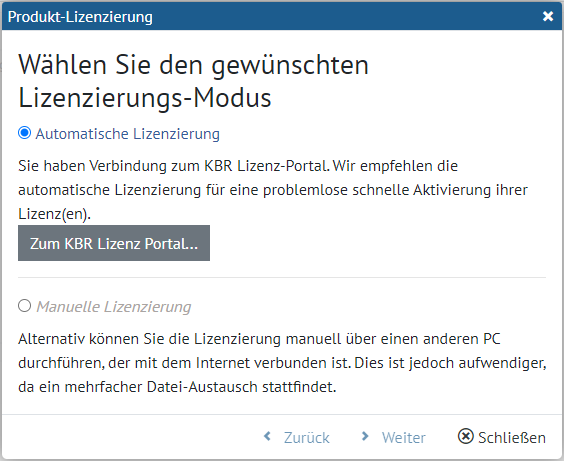
A new browser window containing the licence portal will open.
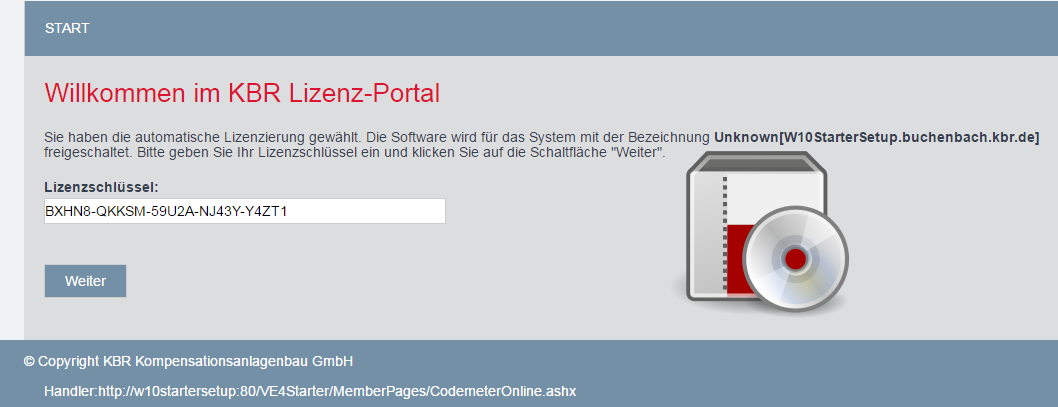
Enter the licence key here. It has the format xxxxx-xxxxx-xxxxx-xxxxx-xxxxx and was supplied on a form with the CD. The licence key you have entered will be checked, and the corresponding product will then be displayed. Please check this against your order and then proceed to “Register user”. If several products or licence containers are installed on the system to be licensed, you will have another opportunity to make a selection. Otherwise, select “Activate selected licences now”. The licence container is now automatically transferred to the system to be licensed and registered there. A confirmation that the registration was successful is then sent to the licence portal. The product is therefore licensed.