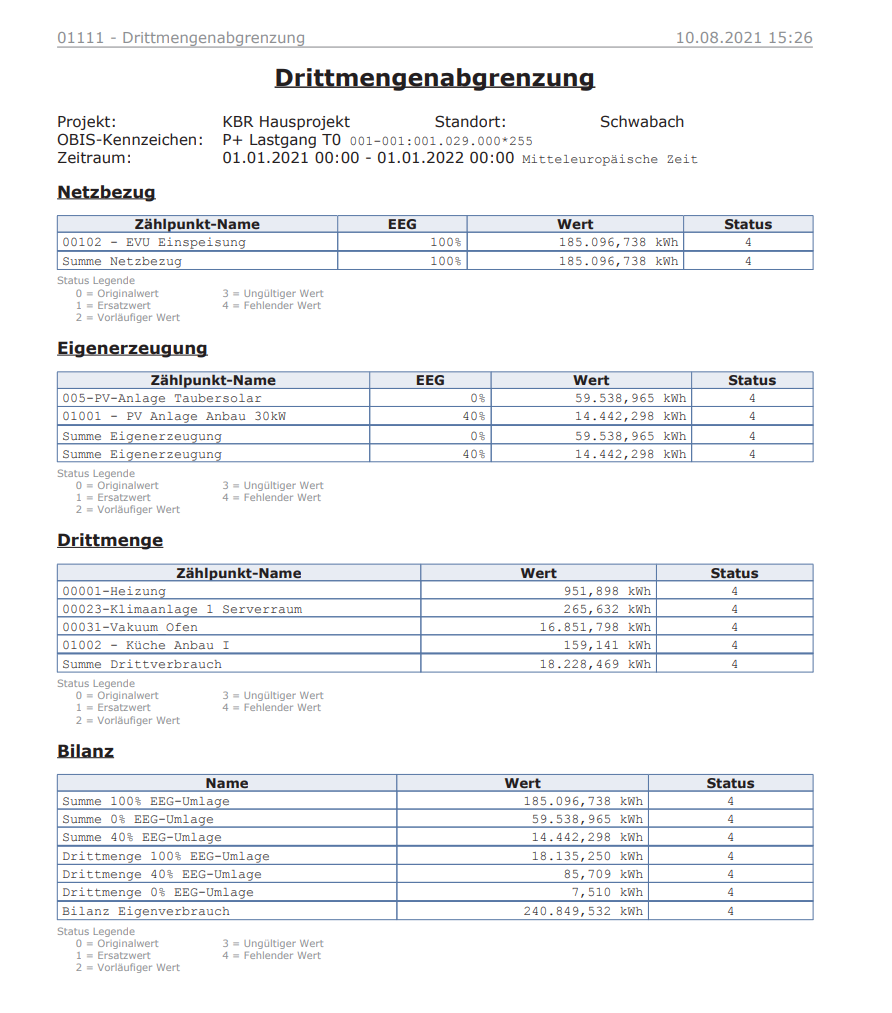
Third-party consumption delimitation
Third-party consumption refers to electricity consumed not by the company itself, but by third parties within the company – for example, by external contractors (cleaning services, canteen operators), subsidiaries or subtenants on the company premises. These electricity quantities often need to be delimited to ensure that only the company’s own electricity consumption is taken into account for the purposes of levy privileges.
This report lists third-party consumers and their energy quantities. Third-party consumers can be selected when defining the report. This provides a PDF document for annual reporting. In the case of self-generation plants and 15-minute-interval delimitation, a CSV file is also generated.
NOTICE

This report was based on a German legal provision that is now obsolete. The EEG levy was reduced to 0 cents/kWh on 1 July 2022 and was completely abolished from 1 January 2023.
The Energy Financing Act (EnFG) has governed the financing of the energy transition in Germany since 1 January 2023 and has replaced, among other things, the EEG levy. It contains several levy privileges that apply to specific electricity consumption – and in which the delimitation of third-party consumption continues to play a key role.
Where can I find this workflow? Evaluation section => Documents => + Add => Reports |
Properties
Name/Designation/Title | A meaningful text entry. The designation is used for identification and search purposes and can be changed at any time. |
Time span | Defines the time span:
|
Grid supply |
|
Self-generation |
|
Third-party consumers |
|
Language | Select German / English – Sets the report language. |
File name | Text – Specify the name of the output file (without a suffix such as .txt or .pdf). Note:In workflows that export multiple intervals to separate files during a run, use the “Automatic file name generation” option instead of specifying the file name manually. Otherwise, specifying a file name will result in the generated output file containing only the values from the last time interval. |
Overwrite document | Yes / No – Specify whether a document previously generated by this workflow should be overwritten in the same folder. |
Target folder | Selection – Select the visual energy folder in which to save the output file. |
Email recipient list | Text – Specifies the recipients to whom the email should be sent. Recipients can be separated by semicolons. |
Completion trigger | Trigger – Specifies the trigger that is executed once the workflow has finished. |