Login
Before you can use the visual energy Excel add-in, you must set up the connection and user login in the settings.
Preparation
To log in, you will need to provide some information, all of which is available in your user profile on the visual energy website.
- Open your browser and log in to visual energy as usual.
- Open your user profile.
- In the Excel/WCF access token section, create a new token. If a token already exists, please check its expiry date. Delete any existing token and create a new one.
Set up and test the login process once
- Open Microsoft Excel and navigate to “visual energy” in the main menu
- In the visual energy toolbar, select the Settings button. The setup dialog box appears.
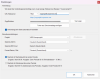
- Copy the URL (Excel) from your profile into the Web server URL field.
- Copy the token from your profile into the Access token field.
- Test the connection.